In this page
IDE Support
To provide a seamless development experience, GreyCat offers dedicated extensions for popular Integrated Development Environments (IDEs). These tools integrate the GreyCat Language Server (LSP) to provide consistent features across different platforms, including real-time diagnostics, intelligent code completion, and advanced navigation.
Supported IDEs
GreyCat currently supports the following IDEs:
- VS Code Extension: The recommended environment for full-stack GreyCat development, offering native TypeScript support alongside GreyCat.
- JetBrains Plugin: Compatible with all JetBrains products (IntelliJ IDEA, CLion, WebStorm, etc.). This plugin utilizes the LSP4IJ integration from RedHat, which can also host a TypeScript LSP for full-stack development.
- Zed Extension: A high-performance extension for the Zed editor.
Manual LSP Integration
If you prefer using an editor not listed above (such as Neovim, Emacs, or Sublime Text), you can manually integrate GreyCat’s Language Server.
The official GreyCat installation script installs both the greycat runtime and the greycat-lang utility. The latter includes the Language Server Protocol (LSP) implementation.
Starting the Server
To start the LSP server, use the following command:
greycat-lang server
The server communicates via Standard I/O (stdin/stdout), which is the default for most LSP clients. Ensure that the greycat-lang binary is available in your system’s PATH.
Features & Capabilities
The GreyCat LSP is a full-featured implementation that supports:
- Intelligent Navigation: Go to Definition, Find References, and Document Symbols.
- Code Editing: Real-time diagnostics, incremental synchronization, and document formatting.
- Enhanced Feedback: Context-aware completion, signature help, hover information, and inlay hints.
- Advanced Tools: Semantic tokens for precise highlighting, code actions, and code lenses for running functions or tests.
- Project Awareness: Automatic project discovery through
project.gcland resolution of@include()and@library()statements.
To integrate it with your editor, configure your LSP client to use greycat-lang as the executable with server as the initial argument.
Key Features
The GreyCat extensions provide a professional development environment with a focus on productivity and code quality:
- Syntax Highlighting & Semantic Tokens: Advanced code colorization that goes beyond basic regular expressions to provide precise highlighting based on the language’s semantics.
- Real-time Diagnostics: Instant feedback on errors, warnings, and hints as you type, powered by continuous static analysis.
- Intelligent Code Completion: Context-aware suggestions for functions, types, and variables, including support for libraries and modular projects.
- Advanced Navigation: Quickly navigate large codebases with “Go to Definition,” “Go to Implementation,” “Find References,” and symbol search.
- Integrated Documentation: Instant access to symbol documentation through tooltips and completion metadata.
- Automated Refactoring: Safe project-wide symbol renaming and automated code actions.
- Formatting & Style: Built-in document formatter that ensures consistent code style according to project-wide or default settings.
- Inlay Hints & Signature Help: Inline type information and parameter hints to improve code readability and reduce errors during function calls.
- Code Lenses: Quick-access actions directly in the editor to run functions or execute tests.
Syntax Highlighting & Static Analysis
GreyCat files (.gcl) are automatically recognized and highlighted. For editors that support it, the Language Server provides Semantic Tokens, ensuring that symbols are correctly identified and colored even in complex scenarios.
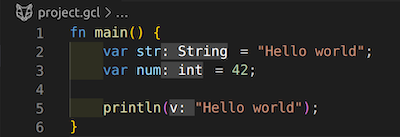
Static analysis runs continuously in the background, identifying potential issues before you even save your file.
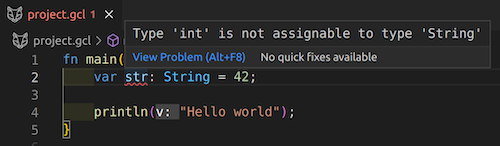
Note: For full project-wide analysis, the extension relies on the presence of a
project.gclfile. The analysis server resolves the entire project structure by following all@include()and@library()statements.
Intelligent Code Completion
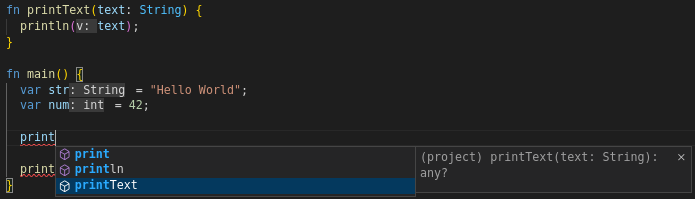
The extension provides context-aware assistance, helping you discover available symbols and keywords. It also supports lazy-loading of library versions and other metadata to provide a smooth experience even in large projects.
Integrated Documentation
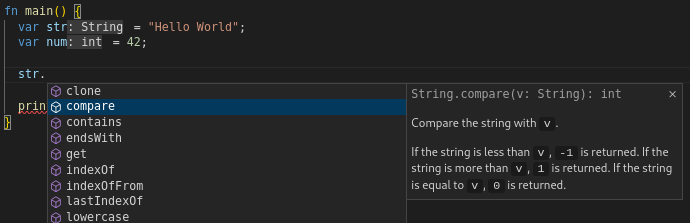
Documentation for symbols is integrated directly into the development workflow. Detailed information is displayed during auto-completion and when hovering over a symbol.
Navigation, Refactoring & Testing
The extension provides essential tools for maintaining and testing your code:
- Navigation: Use “Go to Definition” or “Go to Implementation” to quickly jump to the source of any symbol.
- Symbol Renaming: Safely rename variables, functions, or types across your entire project.
- Testing and Execution: Look for Code Lenses (small text overlays) above your function declarations to quickly “Run” a function or “Run test” directly from the editor.
- Formatting: Use your IDE’s standard formatting command to automatically clean up your code according to GreyCat’s style guidelines.